"Google Instant Not Working" - Instant fall of the Search

Early morning when we got up, we saw 100's of news & updates about GOOGLE INSTANT. Everybody was talking about it! But seems like Google Instant has crashed (only for the moment we hope) in the very few hours of it's launch.
Everybody is again talking about it, See the Numbers 31,600,000 pages already!


What's the reason - surely some glitch. I am sure a Press Release is on it's way shortly. Lets wait and watch.

[..read more]


Install Facebook LIKE BOX to Your Blogger & Wordpress Blogs

Everyone brand / product / service / website essentially have a Facebook Page these days. Placing a Facebook LIKE BOX at a key spot on your Blog or site is the nice way to create access for visitors to stay tuned with your offerings.

Here's how to add Facebook LIKE BOX on your blog. (I have mentioned for both Wordpress & Blogger below, Take your Pick)
Remember, It's only possible on Self hosted Wordpress blogs,  blogger and websites. Don't waste time looking to place it on Wordpress.com free hosting. Whether or not you have a unique URL.. It's essential that the WP blog is self hosted to place the like box. You can't install a facebook like box in wordpress.com

Common Steps for Both - 
Go to http://developers.facebook.com/plugins. There is an alternate way to do it by going through Edit page of Facebook, but I find this much easier.

Select "Like Box" from the menu on right column (Please Note there is a difference between LIKE BOX and LIKE BUTTON, so don't confuse yourself)

Now you need to enter your page details and preferences on the form.

1. Facebook Page ID - These are the unique numbers assigned to your page. To find your Page ID - Go to your facebook page, Click on your profile picture and in the Navigation Toolbar (Where you write the URL's) look for a long number code. Copy and Paste it on the Form


2. Set your preferences in terms of size, no. of fans to show, not show etc and hit GET CODE.


Now Copy the Iframes or Xfbml Code (as preferable on your site). For Blogger choose the Iframes Code.


Install Facebook Like Box on Blogger
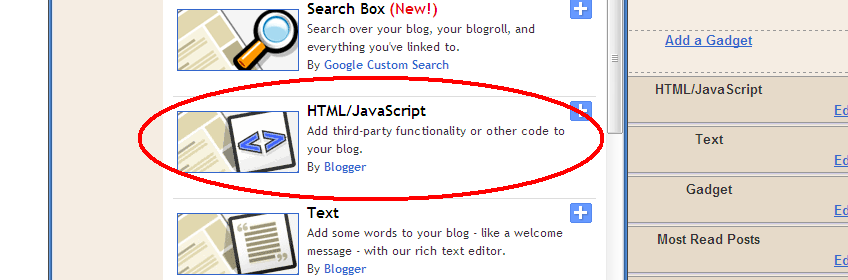
Paste the iframe code on your HTML/Java box in blogger through page elements.


Install Facebook Like Box to Your Wordpress (Selfhosted) blog
1.Go to Widgets under Appearance
2. Find TEXT widget and Drag it to your side bar
3. Paste the Iframe Code to it, and Save.


I hope that's helpful, Let me know if any problems.


[..read more]


How to Auto Publish from Blogger to Facebook Page

Well - that was my search query a couple of months back "how to auto publish from blogger to facebook page" - thought it was worth sharing!

So how do you do it?

Step 1 - Go to EDIT PAGE right under your page profile picture.
Step 2 - Scroll Down and look for NOTES
Step 3 - On Notes, Hit the EDIT Link

Step 4 - Scroll down to the bottom again and look for EDIT IMPORT SETTINGS

Step 5 - On the Next Page, Fill in your RSS Feed link in the space provided, check the authorization box and Hit it!

Now your posts on blogger will be Auto Published every time you put a new one! This will save you some extra minutes everyday + if you have already integrated the Facebook with Twitter, one more step will be saved!

Important: While auto publishing, to make sure that your feeds are published on the WALL for sure , on your EDIT PAGE > Under NOTES > Click 'APPLICATION SETTINGS and see that the 'Publish Content to my wall' is checked or not checked, as per what you desire.


Once you have integrated these settings all your earlier posts will get published all at once on the wall. So make sure you have either disabled the 'Publish to Wall' first or instead go and manually remove the feeds on the wall that you don't want to flood the page with.

Wordpress users can also follow same steps to auto publish blog posts from wordpress to facebook page.

[..read more]


Facebook Resizes Fan Page Tabs - FBML Users Take Note!

Unfortunately many people & brands have still not taken note that Facebook has fixed New Size for Tabs  in a recent development ; from 760px to 520px in width.

How does it matter to you? Well if you are administering a Facebook Fan Page and using the excellent FBML app then you need to resize (or create) your fbml images to max 520px in width and not more than that.


Facebook claims
"These updates are designed to simplify navigation for users, reduce complexity for developers, and enable us to build the next generation of tools for growing your business with Facebook."

But I agree far more with  Mike Richwalsky on his blog.
Quote - "Said another way: we need the room for ads. That’s my take" 

Well, ones gotta do what ones gotta do ;)

[..read more]


The New DIGG Version 4. - REVIEWED!

New Digg Version 4 Review
I have to say that I have always been intrigued by Digg, but never really used it that much – Probably because it lacks the ‘Instant Gratification’ factor in terms of Traffic unlike Twitter & Facebook unless you hit on a rock of a link. Though I have seen visits to my blogs from digg, but over a period of Time.

Moving on – The New DIGG here. DIGG Version 4. Whether it saves the company or breaks it, will be decided in coming months.
A quick review & round up on the new digg –

Twitter Login
First thing one might notice, or atleast I did was that it has Twitter Login too now, along with Facebook. Yay to that. (+1)

Improvised & 3 Step Digg Submission
This is one great thing on the new digg, they have made digging posts really user friendly, right uptop and a three step process Submit link > Add description > Choose category and You are done. (+1)

Follow your favorite Diggers
In already much imitated Twitter style, now you can follow your favorite people. You can see what they have Dugg and links they have submitted under the MY NEWS link up top. This means I can filter stuff what I like to read (+1 to that too.)
On the contrary isn’t that the same thing we do on all other social networks now like Follow on Twitter and Like on Facebook and Rss on Readers, what’s new? Same links would be rotated everywhere! In this process Digg has just lost its identity. (-1 to that)

They are Suggesting people to follow - Another familiar sounding feature? (+-1)

Top Diggers has been removed. Was it really that bad a feature? - Apparently focus is on Personalised streaming of Content (Big -1)

Upcoming Diggs Section is also removed. Din’t see it anywhere till now (-1)

My Favorite feature? Import Feeds under Settings – Allows one to submit their RSS feed link and automatically the new posts are dugg. Awesome (+1)
On the con side – This will increase Spamming and irrelevant postings to great extent and lot less visits to Digg (-1)

(Update) - On trying to find my Tweets oops...Diggs
Its really difficult to figure out where to go and see your profile from unless you have figured out it first go. More precisely if you are looking for your own diggs then you are looking for that link which you can't seem to find unless you click on the Tiny Profile Image on Top Bar. (Newest -1)

And yes, Don’t get bugged by the many ‘bugs’ on the new site right now (-1) … New system Start up jitters?
Whats the Graph like for Digg now, we’ll find out soon. (Update: It's already out! Read how Diggers are showing protest for the New Version!)

How about sharing with everyone your personal digg 4.0 experience?!

[..read more]


How to UnTrack Own Visits from Blogger Stats

So like I was contemplating on my 'How to get stats on your blogger dashboard' post -  I did figure out how to stop tracking own Pageviews in blogger stats. Easy as it is.

On your Stats Page > Overview > Right Section of the page (Below the Today, Yesterday etc Stats), You will see this link
'Don't Track Your Own Page Views'


Click on it and Mark your preference for the blog.

Please make sure that every time you delete your browsing history, cache or cookies - you should go through the same process again. As Untracking is happening due to Blocking of Cookies. 

Secondly if you are the one to use two or more browsers on the same work station then do it for every browser. 


[..read more]


I Introduce You to - Search Cheat Sheet by Google (Part 1)

How many times have you seen an examiner handing over Cheat Sheets? .. and then comes Google :)

Well not exactly Cheat codes as named but these are some cool tricks that Google has listed to make your search more efficient and precise. 
OPERATOR EXAMPLE FINDS PAGES CONTAINING..
vacation hawaii the words vacation and Hawaii .
Maui OR Hawaii either the word Maui or the word Hawaii
"To each his own" the exact phrase to each his own
virus computer the word virus but NOT the word computer
+sock Only the word sock, and not the plural or any tenses or synonyms
~auto loan loan info for both the word auto and its synonyms: truck, car, etc.
define:computer definitions of the word computer from around the Web.
red * blue the words red and blue separated by one or more words.
I'm Feeling Lucky Takes you directly to first web page returned for your query.


More in Next Post - Stay Tuned

 
[..read more]


Add Social Bookmarks to Wordpress.com

Get Sharing & Bookmarking Links on Your Wordpress Blog NOW!
Wordpress is on a roll! Every day a new announcement. My last How to get Tweet button on Wordpress post now becomes obsolete with in 2 days, thanks to WP!

Finally they have introduced the much awaited, asked and prayed for -  Bookmarking links - all over your wordpress.com blog! I am totally thrilled as 6 of my blogs are hosted there :)
Moving on -
To get these SHARING links on your blog - Go to Settings > Sharing in your left panel of the WP dashboard.

Now Just drag the links you want on your posts. You can select whether you want it on just the posts or index pages as well. And your Sharing links are READY!


You can also add another Sharing site then those pre-fed on WP. 

While I am writing this post a new announcement has been made about 'Instant communication of posts and comments with Jabber' - I wonder whats with the aggressive development spree, not that am complaining... Just love it :)


[..read more]


Wordpress Makes Tweeting Damn Easy

If you have been looking for an answer on google to "How can I add a Tweet button to Wordpress Posts" - Here it is!
Before introducing the Zemanta -Wordpress Partnership, Wordpress had announced its integration of TWEET button (as Facebook LIKE). This does not appear on the entire blog but on individual posts, which is good enough! Much to the reprise of Wordpress.com users.

Again, Very easy to activate.
1. Go to your WP Dashboard > Extras
2. Check the 'Show a Twitter Tweet button on my Posts'

3. Start Tweeting!


Awesome move by Wordpress, Whats next in line... Facebook Like? ;)

To stay updated about the latest updates on the blog, Subscribe to the Blog Email updates (Here) or Connect with me on Twitter
[..read more]


Wordpress Partners with Zemanta - Add Relevant Photos & links with a click!

Wordpress.com is making some giant tweaks in these days making itself much more easier and user friendly. Latest addition is it's Integration with Zemanta
Its a really cool feature where when you add a post to your blog (in visual mode, not html) you get relevant Photos and other articles of similar nature which can be linked directly in your post.

"Once you’ve activated Zemanta, you’ll see several new widgets on your edit screen that let you quickly add recommended links, photos, tags, and articles. With just a few clicks your post goes from simple to snazzy. "

How to Activate Zemanta?

First - Go to your PERSONAL SETTINGS in Wordpress dashboard.

On Personal Setting Page, Scroll down till you see 'Additional Post Content'


Check it, Scroll down further and click SAVE CHANGES.  Then move to Add New Post.


Find your Zemanta Widget in the Right panel. Always remember that Zemanta will show recommendations only in Visual Mode, not HTML. After entering few initial words, hit 'Update' on the Zemanta Widget and you'll start seeing a host of relevant Photos and articles that you can easily drag and link in your own post for more references and credibility.

Bottom Line: You save plenty of time from not googling the right pictures & content to back up your post. It's right there!


[..read more]


How to Get Stats on Your Blogger Dashboard

Search String: Does blogger have Stats

Wouldn't we love to have the stats show right up there on our Blogger dashboard (much like Wordpress but only better) without bothering to login to an external client like statcounter etc.

Its really simple actually.

Step 1 - Sign in your blogger.

Step 2 - Scroll right down to the bottom. You will see this "Blogger in Draft" link. Hit it.

Step 3 - Your Stats are ready for you! Wasn't that easy.


Step 4 - You will see this Check box on top. Incase you want to keep the blogger in draft settings all the time. Check it.


Stats in Blogger are a lot similar to Google analytics, but less comprehensive. But really great for beginners or otherwise.
On the con side - Your own visits to the blog would be counted. I haven't found a way out yet but till then you know how to do the little calculation :) [Update: I did find out How to Stop Counting own Visits on Blogger Stats]

Whats "Blogger in Draft" really?
Blogger in draft is a special version of Blogger where the developers try out new features before releasing them to everyone. Think of it as a sandbox, or laboratory, or just “Blogger + new things.” By taking our feedback and looking at what works and what doesn’t, they are able to make features that much better before releasing to everyone. Don't worry, it would not create any sudden mishaps on your blog. They might withdraw certain feats but that does not affect rest of the blog


[..read more]