Showing posts with label Facebook Fan Pages. Show all posts

Facebook Contact Importer Tool - Easy Way to Use Email Lists to Increase Your Fan Base

Update: Those who can't find Facebook Contact Importer Tool in new design, scroll down the post to find out.
Facebook recently added a new feature to its fan pages. A Facebook Contact Importer Tool which will help you send invites to your Selected Email List. Lot of fan page admins must have already seen this notification on top of the page.


The feature works just like the how we find our friends through importing contacts from our address books as a person on facebook or other sites. After importing the list all the non fans of your page will be shown and you can select who all the invitation to join needs to be sent. Quite simple.


You can either upload a .CSV file (mostly) or Import directly through your web email address book like that of Yahoo, Gmail, Hotmail. For desktop clients like Outlook, outlook express you will need to first export your address books and save them as csv files and then upload to this contact uploader. A detailed step by step guide for all is given like Mozilla Thunderbird, Mac, Palm etc during the process itself.

Its a very convenient tool to use and makes your contact management really easy. Imagine wanting all your previous clients know about your facebook page? No need to use the Email blasters or anything! 3-4 clicks and all your clients would know about your facebook page. A must use tool for people with New Facebook fan pages to get the initial number of Fans.

If you don't see the notification on top of your page, just go to Edit page and find Contact Importer.


How to use Facebook Contact Importer for Feedburner Email Subscribers? 
If you want to Send invitations to your Feedburner Email List through Facebook Contact Importer, as most of us use it for Syndication. Here's what to do -
Sign in to Feedburner > Go to your Feed > Click on Publicize > Under Email Subscriptions click on Subscription management > Scroll down and Find View Subscriber Details > Now click on Export CSV  and get your list to be uploaded on Facebook!


Do You Know - How to Install Facebook LIKE BOX to Your Blog? Find Out >

Update: New Location of Contact Importer - November 30th 2010
For all those who could not find the Contact Importer recently finally Facebook has added it again in new panel. So where is that MISSING Facebook contact importer now?
Go to Edit Page > Marketing > Tell Your Fans.  


[..read more]


Install Facebook LIKE BOX to Your Blogger & Wordpress Blogs

Everyone brand / product / service / website essentially have a Facebook Page these days. Placing a Facebook LIKE BOX at a key spot on your Blog or site is the nice way to create access for visitors to stay tuned with your offerings.

Here's how to add Facebook LIKE BOX on your blog. (I have mentioned for both Wordpress & Blogger below, Take your Pick)
Remember, It's only possible on Self hosted Wordpress blogs,  blogger and websites. Don't waste time looking to place it on Wordpress.com free hosting. Whether or not you have a unique URL.. It's essential that the WP blog is self hosted to place the like box. You can't install a facebook like box in wordpress.com

Common Steps for Both - 
Go to http://developers.facebook.com/plugins. There is an alternate way to do it by going through Edit page of Facebook, but I find this much easier.

Select "Like Box" from the menu on right column (Please Note there is a difference between LIKE BOX and LIKE BUTTON, so don't confuse yourself)

Now you need to enter your page details and preferences on the form.

1. Facebook Page ID - These are the unique numbers assigned to your page. To find your Page ID - Go to your facebook page, Click on your profile picture and in the Navigation Toolbar (Where you write the URL's) look for a long number code. Copy and Paste it on the Form


2. Set your preferences in terms of size, no. of fans to show, not show etc and hit GET CODE.


Now Copy the Iframes or Xfbml Code (as preferable on your site). For Blogger choose the Iframes Code.


Install Facebook Like Box on Blogger
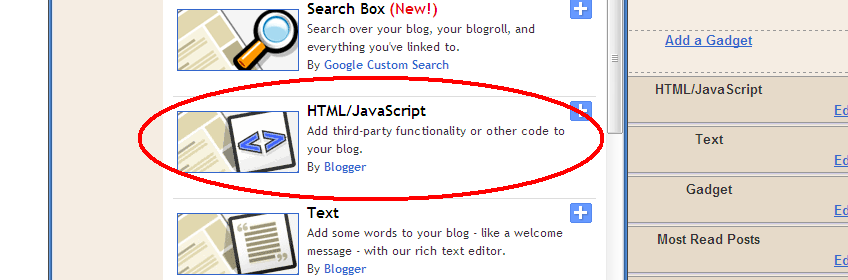
Paste the iframe code on your HTML/Java box in blogger through page elements.


Install Facebook Like Box to Your Wordpress (Selfhosted) blog
1.Go to Widgets under Appearance
2. Find TEXT widget and Drag it to your side bar
3. Paste the Iframe Code to it, and Save.


I hope that's helpful, Let me know if any problems.


[..read more]


How to Auto Publish from Blogger to Facebook Page

Well - that was my search query a couple of months back "how to auto publish from blogger to facebook page" - thought it was worth sharing!

So how do you do it?

Step 1 - Go to EDIT PAGE right under your page profile picture.
Step 2 - Scroll Down and look for NOTES
Step 3 - On Notes, Hit the EDIT Link

Step 4 - Scroll down to the bottom again and look for EDIT IMPORT SETTINGS

Step 5 - On the Next Page, Fill in your RSS Feed link in the space provided, check the authorization box and Hit it!

Now your posts on blogger will be Auto Published every time you put a new one! This will save you some extra minutes everyday + if you have already integrated the Facebook with Twitter, one more step will be saved!

Important: While auto publishing, to make sure that your feeds are published on the WALL for sure , on your EDIT PAGE > Under NOTES > Click 'APPLICATION SETTINGS and see that the 'Publish Content to my wall' is checked or not checked, as per what you desire.


Once you have integrated these settings all your earlier posts will get published all at once on the wall. So make sure you have either disabled the 'Publish to Wall' first or instead go and manually remove the feeds on the wall that you don't want to flood the page with.

Wordpress users can also follow same steps to auto publish blog posts from wordpress to facebook page.

[..read more]


Facebook Resizes Fan Page Tabs - FBML Users Take Note!

Unfortunately many people & brands have still not taken note that Facebook has fixed New Size for Tabs  in a recent development ; from 760px to 520px in width.

How does it matter to you? Well if you are administering a Facebook Fan Page and using the excellent FBML app then you need to resize (or create) your fbml images to max 520px in width and not more than that.


Facebook claims
"These updates are designed to simplify navigation for users, reduce complexity for developers, and enable us to build the next generation of tools for growing your business with Facebook."

But I agree far more with  Mike Richwalsky on his blog.
Quote - "Said another way: we need the room for ads. That’s my take" 

Well, ones gotta do what ones gotta do ;)

[..read more]