Showing posts with label Blogger Tips. Show all posts

How to Make Blogger Template More Search Engine (SEO) Friendly

Though my site is hosted on blogger, I will be honest and not fail to say that I find Wordpress much more search engine welcoming then blogger, the results sometimes amaze me. It’s not just because of the add-ons they offer but also the basic structure of templates is built that way. But Blogger is not far either; some tweaks can bring you at par with Wordpress quite fast. They have definitely helped my nascent blog. Instead of searching for a SEO friendly Blogger Template, you can just make a couple of improvements in existing one and it's good to go! How have I made my blogger template more search engine friendly? Let’s Roll - 


Add Meta Content
Add relevant Meta Data to make your blogger site more search engine optimized i.e. Meta Description & Meta Keywords. Make sure your Meta description is in form of sentence and legible long tail phrase instead of keywords. That’s how search engines prefer it. Save the Keywords for Meta Keywords area. Keep Meta description below 160 characters to be crisp, readable and avoid truncation.


Page Title Structure
Change the Page Titles from bloggers default setting i.e. [Blog title + Post Title] to only 
[Post Title] or [Post title + Blog title]
The first 6-7 words of your blog and page title are most important search strings for bots along with readability for users. For Example if your blog name is TechPeckXYZ and Your post is ‘How to Earn Money Online in an easy way’ then this should be your Page Title: [How to make money online in an easy way | Teckpeckxyz ]
instead of how its on blogger by default  [Techpeckxyz | How to make money online in an easy way]
Its much more of an issue when your Titles are longer, therefore its better to have post titles in start. 


Add H1, H2 Tags
Change your H1, H2 tags. Especially H1 tags. Usually Blogger by default assigns h2 or h3 tags to your post titles. YOU REALLY DON’T WANT THAT as that is exactly what you want to be searched on at first place ‘your posts’. Change Your Post title tags to H1 for sure.

To stay updated about the latest on the blog, Subscribe to the Blog Email updates (Here) or Connect with me on Twitter


[..read more]


How to Change the Page Title of Blogger Posts (Default to Post Tags)

I had been looking forward to make this tweak in my blogger blog since quite sometime now - How to change Blogger Title Tags - because frankly, blogger feels a little slow in SEO then Wordpress!

Blogger by default places your blog name in the title and there is no way to change it unless you know some coding / html. For individual post pages the default title tag is First the blog name followed by the Post title, which takes your blog 1 step back in SEO for relevant traffic.

For e.g.
My home page tag is "Daily Brawls with Social Media & Marketing" (which is fine for home page btw)

The default title to this posts individual page, if I hadn't made the Tweak would have been:
"Daily Brawls with Social media & marketing - How to Change the Title of Blogger Posts (Default to Post Tags)"

This harms you in 2 ways -
1. If your page gets indexed in search results, the reader would probably only see " Daily brawls with Social Media & Marketing - How to Change......" . You'd certainly not want the reader to see just this vague title and skip your blog.
2. It is widely believed that Title tags should be kept precise and short (7-9 words). Rest of the words are probably ignored by the search engine bots... so that makes a hell lotta difference as all your keywords would come in redundant zone - really problematic with long title names. You wont wanna take that risk either.

Here's how you can change your blogger blog titles of individual posts to their post titles.

Go to Edit HTML in your Dashboard under Design
Now find this line:
<title><data:blog.pageTitle/></title>

Replace it with code below

1. If you want only the Post Title to be the Title Tag

<b:if cond='data:blog.pageType == &quot;index&quot;'>
<title><data:blog.title/></title>
<b:else/>
<title><data:blog.pageName/></title>
</b:if>


2. If you want Post title + Your Blog Title to be the Title Tag


<b:if cond='data:blog.pageType == "item"'>
<title><data:blog.pageName/> |<data:blog.title/></title>
<b:else/>
<title><data:blog.pageTitle/></title> </b:if>

Personally I prefer the 2nd option. Take your pick.


[..read more]


Install Facebook LIKE BOX to Your Blogger & Wordpress Blogs

Everyone brand / product / service / website essentially have a Facebook Page these days. Placing a Facebook LIKE BOX at a key spot on your Blog or site is the nice way to create access for visitors to stay tuned with your offerings.

Here's how to add Facebook LIKE BOX on your blog. (I have mentioned for both Wordpress & Blogger below, Take your Pick)
Remember, It's only possible on Self hosted Wordpress blogs,  blogger and websites. Don't waste time looking to place it on Wordpress.com free hosting. Whether or not you have a unique URL.. It's essential that the WP blog is self hosted to place the like box. You can't install a facebook like box in wordpress.com

Common Steps for Both - 
Go to http://developers.facebook.com/plugins. There is an alternate way to do it by going through Edit page of Facebook, but I find this much easier.

Select "Like Box" from the menu on right column (Please Note there is a difference between LIKE BOX and LIKE BUTTON, so don't confuse yourself)

Now you need to enter your page details and preferences on the form.

1. Facebook Page ID - These are the unique numbers assigned to your page. To find your Page ID - Go to your facebook page, Click on your profile picture and in the Navigation Toolbar (Where you write the URL's) look for a long number code. Copy and Paste it on the Form


2. Set your preferences in terms of size, no. of fans to show, not show etc and hit GET CODE.


Now Copy the Iframes or Xfbml Code (as preferable on your site). For Blogger choose the Iframes Code.


Install Facebook Like Box on Blogger
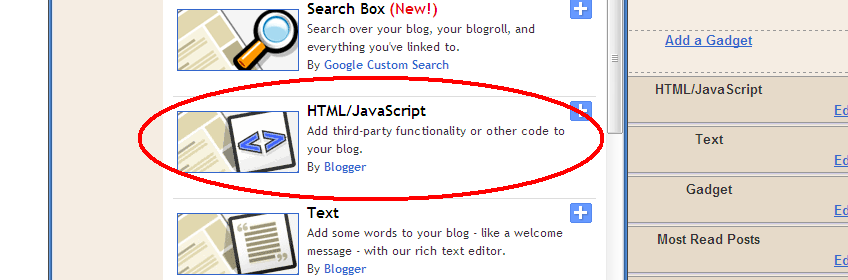
Paste the iframe code on your HTML/Java box in blogger through page elements.


Install Facebook Like Box to Your Wordpress (Selfhosted) blog
1.Go to Widgets under Appearance
2. Find TEXT widget and Drag it to your side bar
3. Paste the Iframe Code to it, and Save.


I hope that's helpful, Let me know if any problems.


[..read more]


How to Auto Publish from Blogger to Facebook Page

Well - that was my search query a couple of months back "how to auto publish from blogger to facebook page" - thought it was worth sharing!

So how do you do it?

Step 1 - Go to EDIT PAGE right under your page profile picture.
Step 2 - Scroll Down and look for NOTES
Step 3 - On Notes, Hit the EDIT Link

Step 4 - Scroll down to the bottom again and look for EDIT IMPORT SETTINGS

Step 5 - On the Next Page, Fill in your RSS Feed link in the space provided, check the authorization box and Hit it!

Now your posts on blogger will be Auto Published every time you put a new one! This will save you some extra minutes everyday + if you have already integrated the Facebook with Twitter, one more step will be saved!

Important: While auto publishing, to make sure that your feeds are published on the WALL for sure , on your EDIT PAGE > Under NOTES > Click 'APPLICATION SETTINGS and see that the 'Publish Content to my wall' is checked or not checked, as per what you desire.


Once you have integrated these settings all your earlier posts will get published all at once on the wall. So make sure you have either disabled the 'Publish to Wall' first or instead go and manually remove the feeds on the wall that you don't want to flood the page with.

Wordpress users can also follow same steps to auto publish blog posts from wordpress to facebook page.

[..read more]


How to UnTrack Own Visits from Blogger Stats

So like I was contemplating on my 'How to get stats on your blogger dashboard' post -  I did figure out how to stop tracking own Pageviews in blogger stats. Easy as it is.

On your Stats Page > Overview > Right Section of the page (Below the Today, Yesterday etc Stats), You will see this link
'Don't Track Your Own Page Views'


Click on it and Mark your preference for the blog.

Please make sure that every time you delete your browsing history, cache or cookies - you should go through the same process again. As Untracking is happening due to Blocking of Cookies. 

Secondly if you are the one to use two or more browsers on the same work station then do it for every browser. 


[..read more]


How to Get Stats on Your Blogger Dashboard

Search String: Does blogger have Stats

Wouldn't we love to have the stats show right up there on our Blogger dashboard (much like Wordpress but only better) without bothering to login to an external client like statcounter etc.

Its really simple actually.

Step 1 - Sign in your blogger.

Step 2 - Scroll right down to the bottom. You will see this "Blogger in Draft" link. Hit it.

Step 3 - Your Stats are ready for you! Wasn't that easy.


Step 4 - You will see this Check box on top. Incase you want to keep the blogger in draft settings all the time. Check it.


Stats in Blogger are a lot similar to Google analytics, but less comprehensive. But really great for beginners or otherwise.
On the con side - Your own visits to the blog would be counted. I haven't found a way out yet but till then you know how to do the little calculation :) [Update: I did find out How to Stop Counting own Visits on Blogger Stats]

Whats "Blogger in Draft" really?
Blogger in draft is a special version of Blogger where the developers try out new features before releasing them to everyone. Think of it as a sandbox, or laboratory, or just “Blogger + new things.” By taking our feedback and looking at what works and what doesn’t, they are able to make features that much better before releasing to everyone. Don't worry, it would not create any sudden mishaps on your blog. They might withdraw certain feats but that does not affect rest of the blog


[..read more]